Meal-time planning
Create breakfast/lunch/dinner plans and quickly calculate insulin based on your profile settings.
In development · iOS & Android planned
Plan meals, record blood glucose, and understand calculations based on your personal insulin settings. Built for adults with Type 1 or insulin-treated Type 2 diabetes, alongside guidance from their care team.
Important: This app/website does not provide medical advice. Always follow guidance from your diabetes care team.

Create breakfast/lunch/dinner plans and quickly calculate insulin based on your profile settings.
Browse foods and build meals from common items (carbs, sugars, serving sizes).
See trends over time with simple charts to help you understand what’s working for you.
Designed for local storage and minimal data collection. Clear, plain-language privacy policy on launch.
Latest in iDC v1
The latest development build adds food scanning and more tools for everyday use. These features are part of the app being tested; public downloads are still coming soon.
Scan a packaged food with your camera, or enter its barcode, to look up a matching product in Open Food Facts. Review its nutrition before adding it to your meal.
Search packaged foods by name alongside your saved iDC foods. Review carbohydrate, sugar, fibre and protein values per 100 g, with a link to the original product record.
Take or choose a photo to get possible common food names or text from a package label. Recognition runs on your iPhone and the photo stays on your device. Suggestions still need checking.
Save regular meals to Favourites and load them again when planning breakfast, lunch or dinner. Adjust the food quantities for the meal you are having today.
Export a backup of your profile, foods, settings and meal history, then restore it in iDC when needed. Keep your backup file somewhere safe.
Export meal history as CSV, or prepare a clinical summary, clinician report or detailed meal report to share with your care team when you choose.
A photo does not determine nutrition, allergens, portion size or an insulin dose. New online product lookups need an internet connection; saved foods remain available offline. Offline photo recognition is currently an iPhone feature, while Android supports barcode and name search.
Product data: Open Food Facts, a community database licensed under ODbL. Records may be incomplete and must be checked.
Insulin Doses Calculator is a simple, intuitive insulin dose calculator designed to support people living with diabetes in making informed decisions around insulin dosing. Built for both Type 1 and insulin-dependent Type 2 diabetes, the app helps users better understand how food intake, blood glucose levels, and personal insulin settings work together.
The app allows users to log meals, view nutritional information, and receive insulin dose recommendations based on their individual insulin-to-carbohydrate ratios and correction factors. By combining structured data with intelligent calculations, Insulin Doses Calculator aims to reduce guesswork and bring greater confidence to everyday diabetes management.
With a clean, user-friendly interface, the app makes it easy to:
Insulin Doses Calculator is designed as a supportive tool, not a replacement for medical advice. All recommendations are intended to complement guidance provided by healthcare professionals, empowering users to stay informed, organised, and in control of their routine.
The app is currently in development and will be available for download in the future.
FREE DOWNLOAD
An iDC bar chart showing selected HbA1c conversions between % and mmol/mol, with a key explaining the six colour bands.
The two-page PDF includes clinical context and linked references. Save a copy or print it to discuss with your diabetes care team.
The ranges have been checked against diabetes.co.uk and Diabetes UK; the six colours help you read the chart. Agree your personal HbA1c target with your diabetes care team.

Step-by-step tutorials
Start with tutorial 1 and follow the numbered order. Each walkthrough explains the buttons, steps and important checks using the current app screens.
Start with Profile in the bottom menu. This is where GlucoPlan keeps the settings used for meal calculations and classification. Work through the whole page before planning meals. The values in this demonstration are examples; use the settings agreed with your own clinical team.
At the top, check Default Ratio Type and Unit of Measure. The ratio switch selects Sugar Ratio or Carbs Ratio. The unit switch selects millimoles per litre or milligrams per decilitre. Match the displayed glucose unit to your meter before entering readings elsewhere in the app.
Review both ratio fields, even when only one is currently selected. Each field is labelled one to x, and accepts a value with one decimal place. Do not copy the demonstration values. A zero ratio cannot be used as a divisor when finishing a meal.
Auto-select ratio per meal allows the app to choose a ratio type from the meal classification. Below it are the carb-heavy and sugar-heavy thresholds. Net carbs means total carbohydrates minus fibre. Sugar share is entered from zero to one, so point two means twenty percent.
Post-meal reading reminders store a due timestamp to support follow-up in meal history. The delay field becomes available when the option is enabled, and its supported range is thirty to three hundred and sixty minutes. Treat this as a recording aid; do not assume a phone notification has been scheduled.
Finally, tap Save Settings and check the saved status and Last updated information. Return to Meal Plan and confirm that the displayed ratio type and glucose unit match. Profile also contains Backup and restore, which has its own walkthrough. Revisit these settings whenever your agreed plan changes.
Explore iDC GlucoPlan: meal planning, food scanning and search, your food library, recommended dose calculations and analytics. Dose and chart examples use fictional demonstration data.
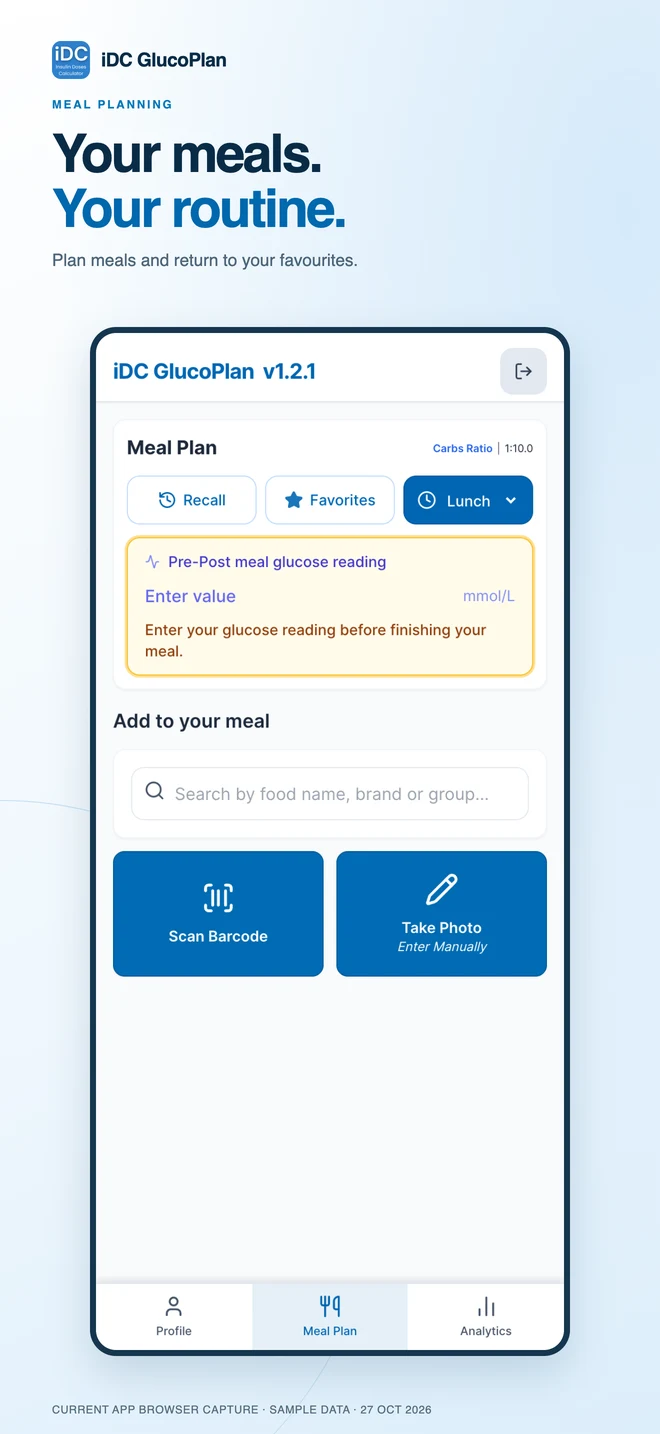
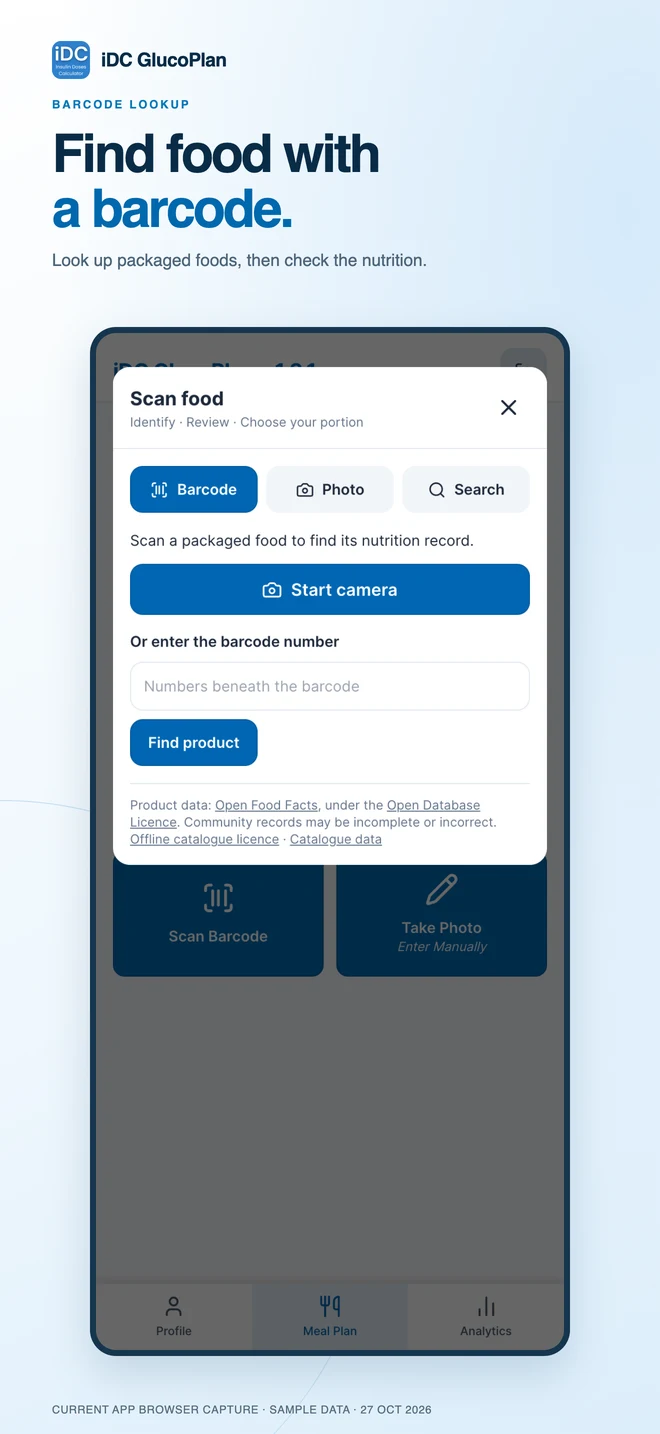
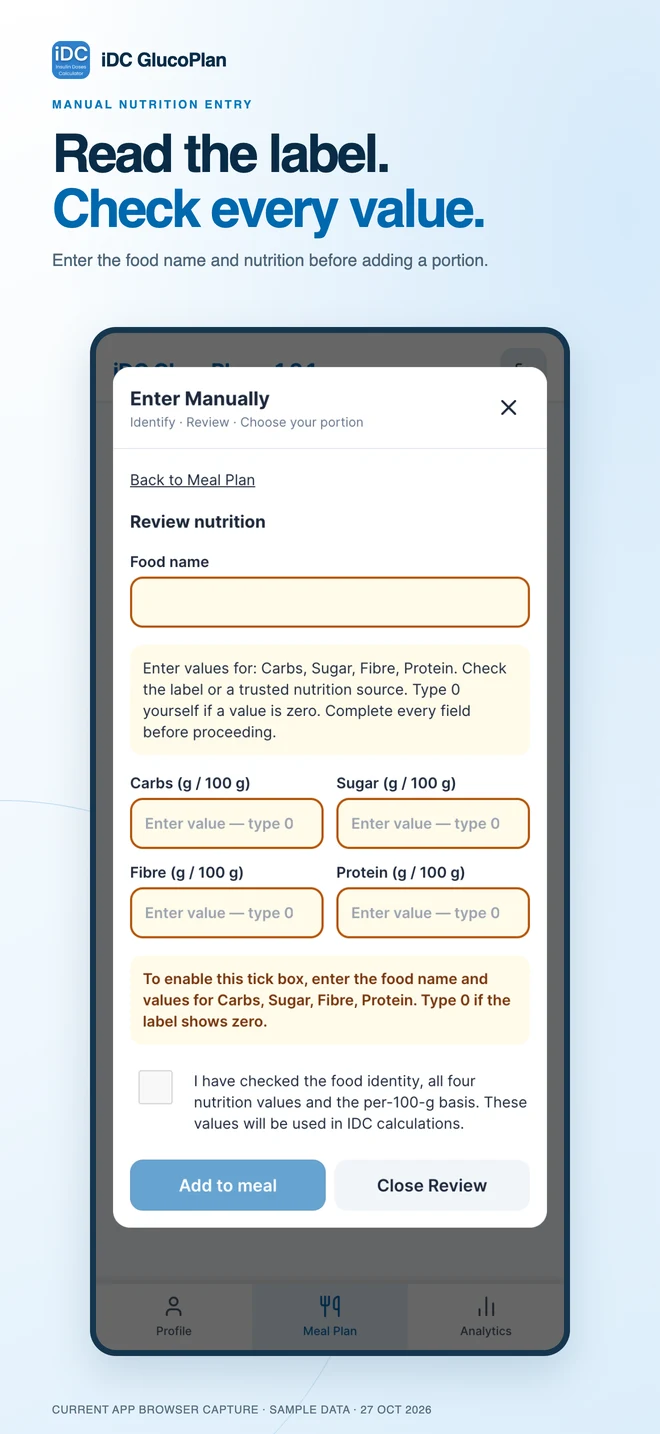
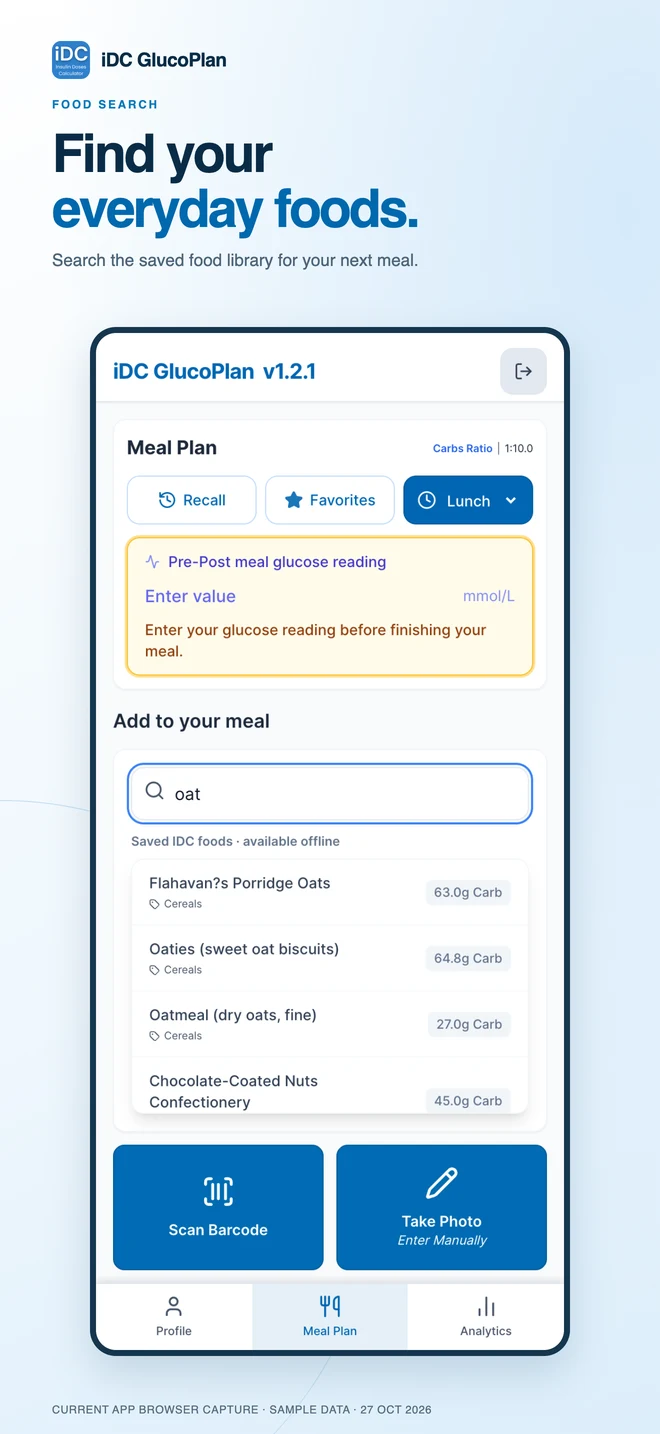
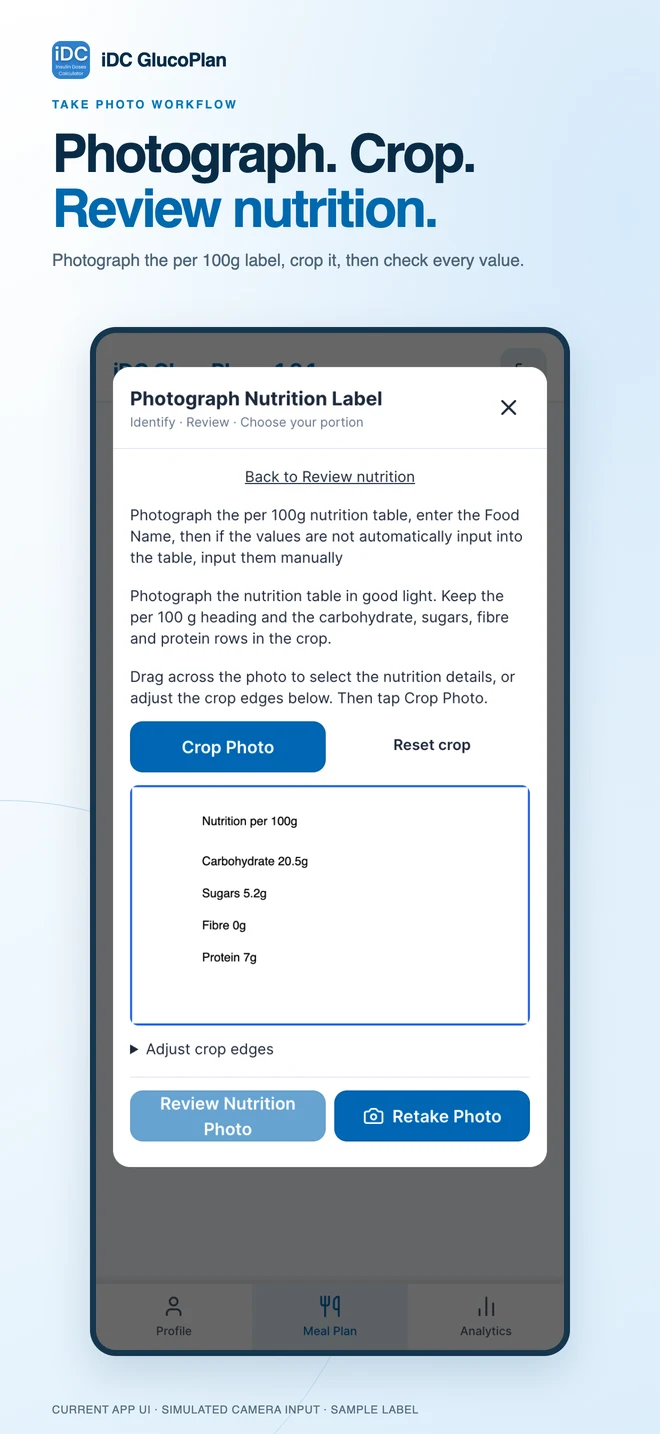
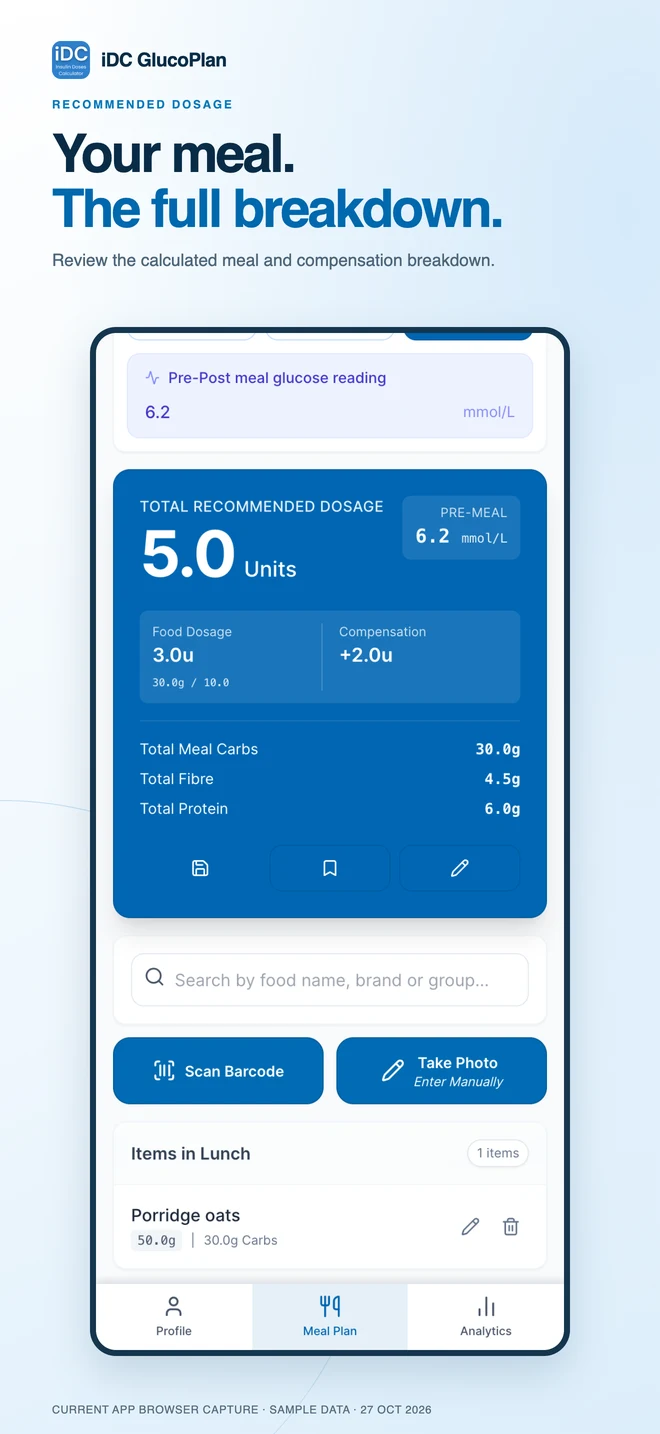
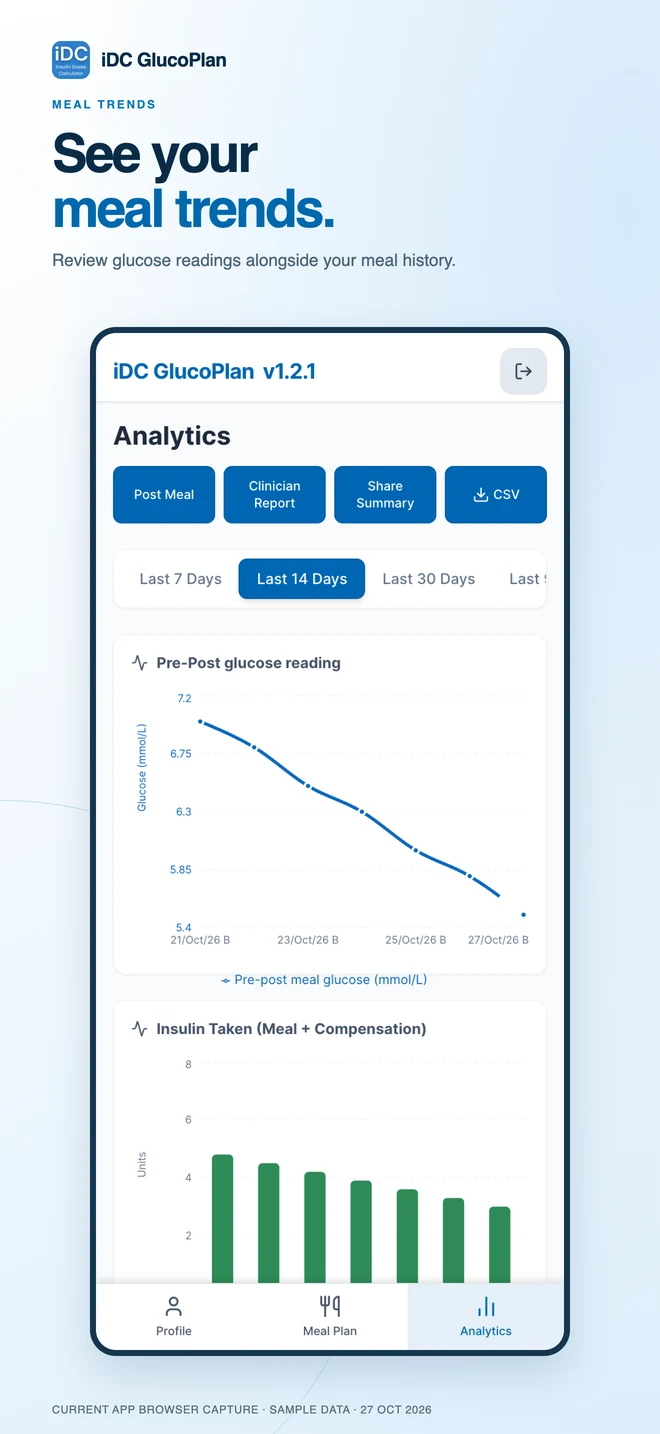
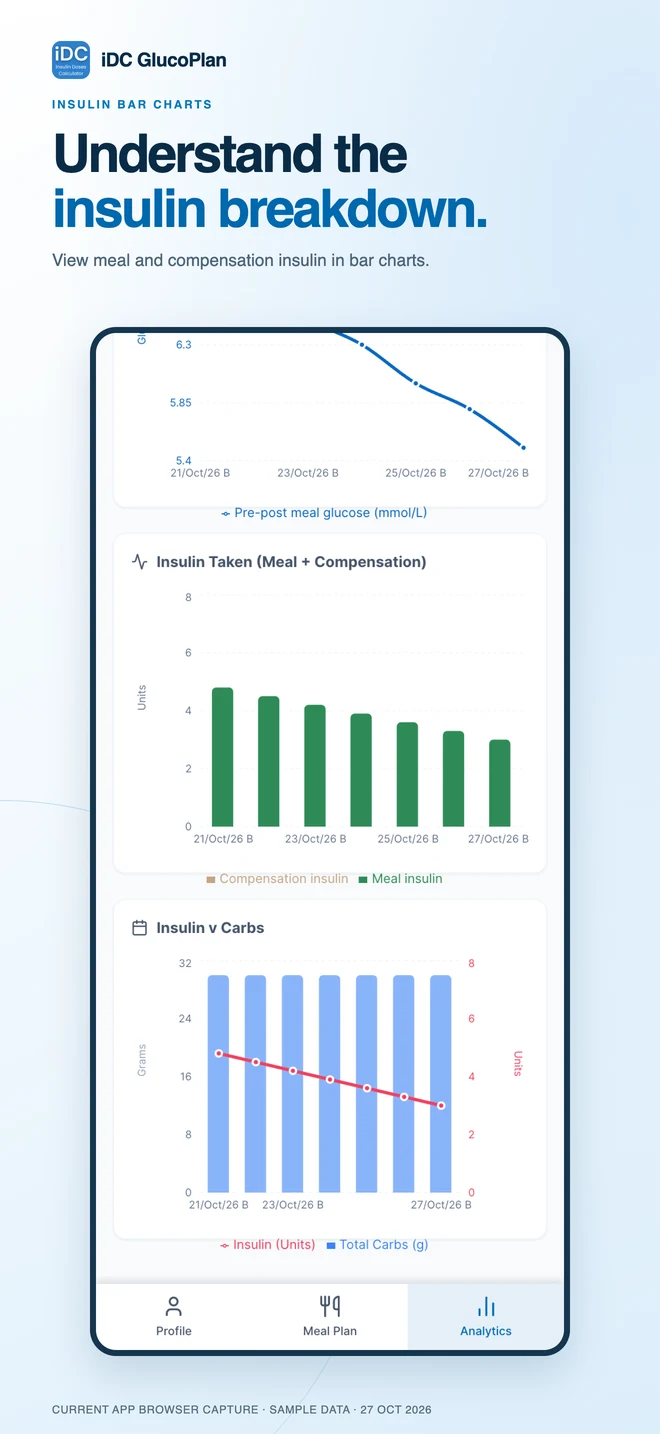
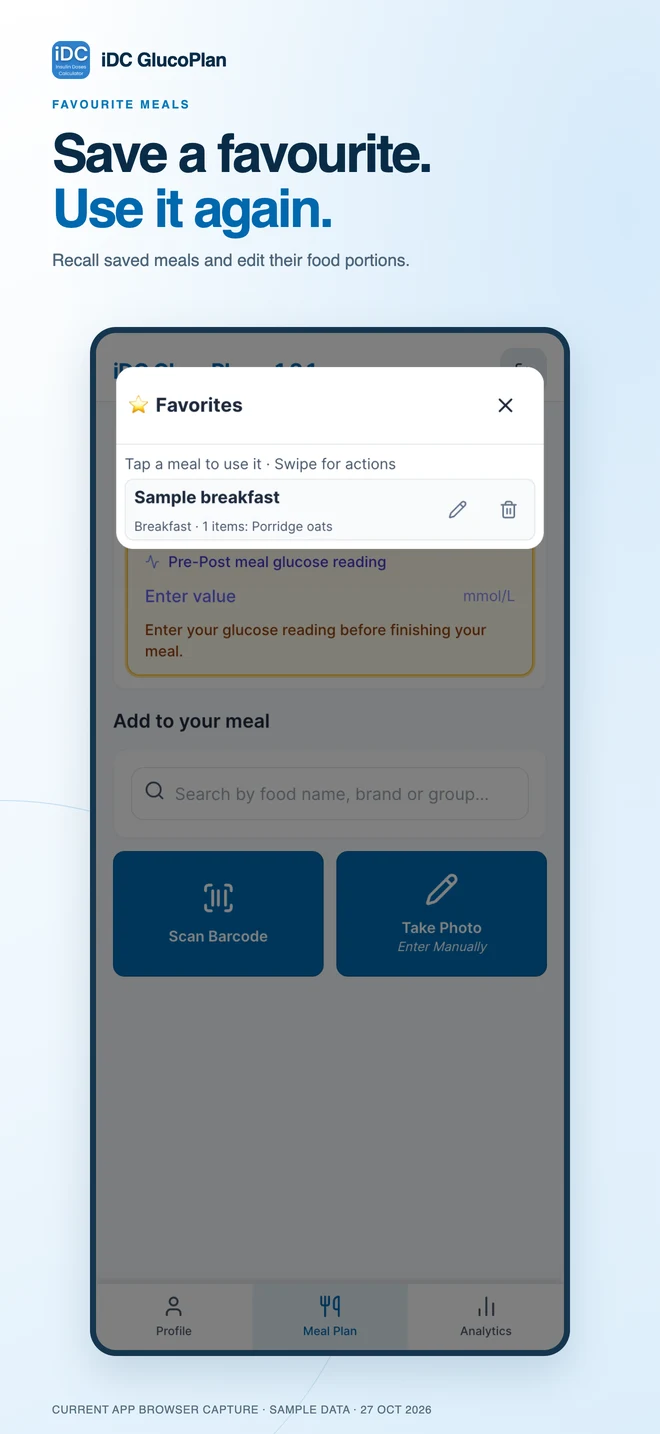
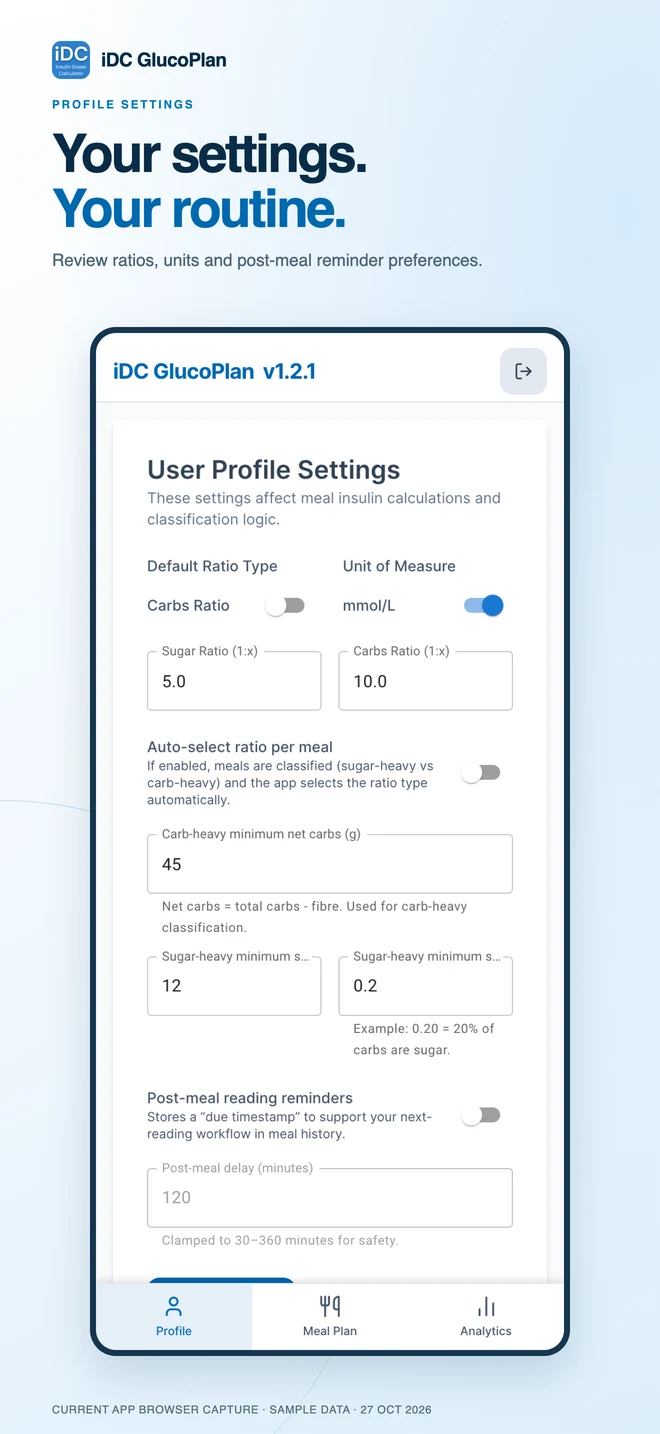
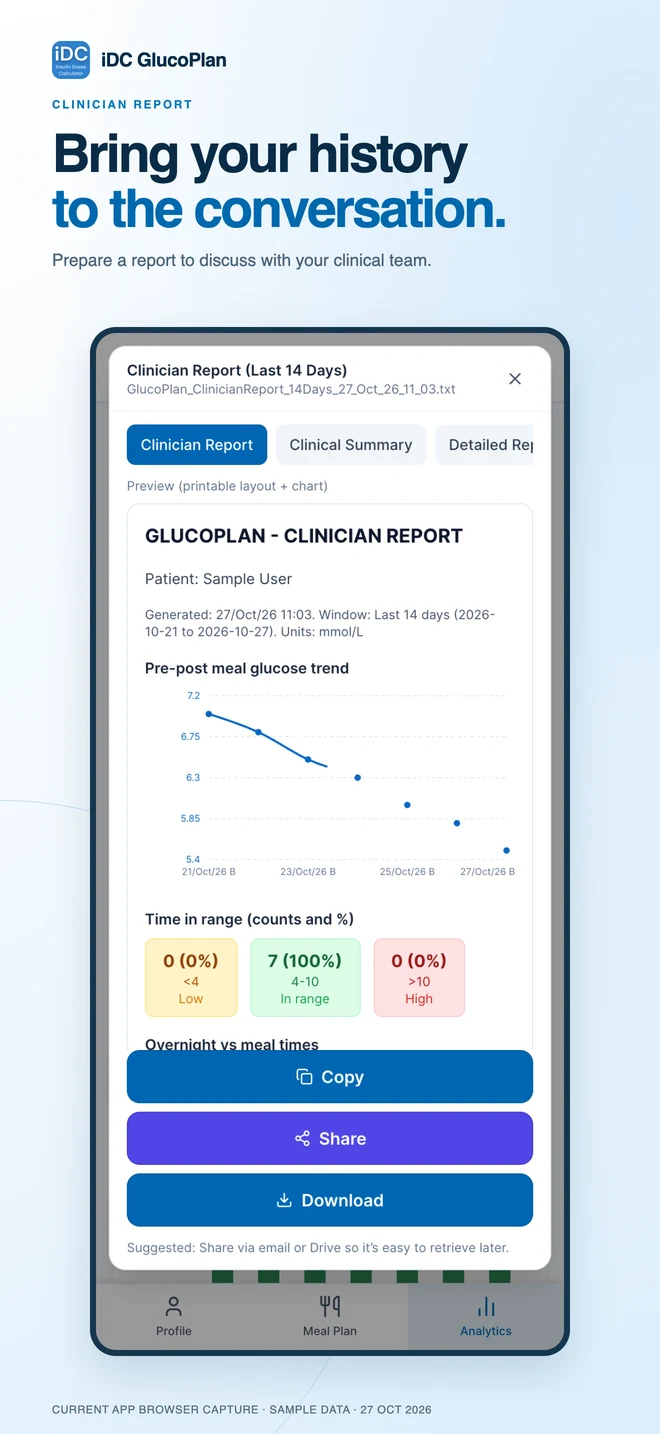
Current app layouts captured in light mode with sample data. Click any screenshot to view it in full size with zoom controls.
Insulin Doses Calculator (iDC) is a support tool designed to help people with diabetes estimate insulin doses. It does not replace professional medical advice.
Scan or type a product barcode, or search by name, to find foods in Open Food Facts. You must check the food identity, carbohydrate, sugar, fibre and protein values per 100 g before confirming it. Then choose your portion in grams. New online lookups need an internet connection.
The updated iPhone app can suggest common food names or read package-label text using offline recognition. Photos stay on the device. It is not a comprehensive mixed-meal recogniser: a suggestion may be incorrect or no match may be found. A photo does not supply nutrition values, allergens, portion sizes or doses. Android currently supports barcode and name search.
Confirmed foods are saved locally and can be reused offline. Regular meals can be saved to Favourites and loaded again. The database screen also lets you export and restore a backup of your profile, foods, settings and meal history. Store backup files safely because they contain your personal information.
iDC is a support tool designed to help people with diabetes estimate insulin doses using information such as carbohydrate intake, blood glucose levels, and personal insulin settings. It is intended to support informed decision-making and does not replace advice from a healthcare professional.
No. iDC is not a medical device and is not intended to diagnose, treat, cure, or prevent any disease. Always follow guidance from your doctor, diabetes nurse, or healthcare team.
iDC is intended for:
The app is not designed for children or for use without prior knowledge of insulin management.
No. iDC provides calculated estimates only, based on the information you enter. You remain fully responsible for deciding whether and how to use any recommendation.
No. iDC is a support tool only. It should be used alongside guidance from your healthcare team, not as a replacement for professional medical care.
Calculations may be based on:
Accuracy depends on correct personal settings and accurate data entry.
iDC uses:
Choose the glucose unit that matches your readings and care-team guidance. Food portions are entered in grams.
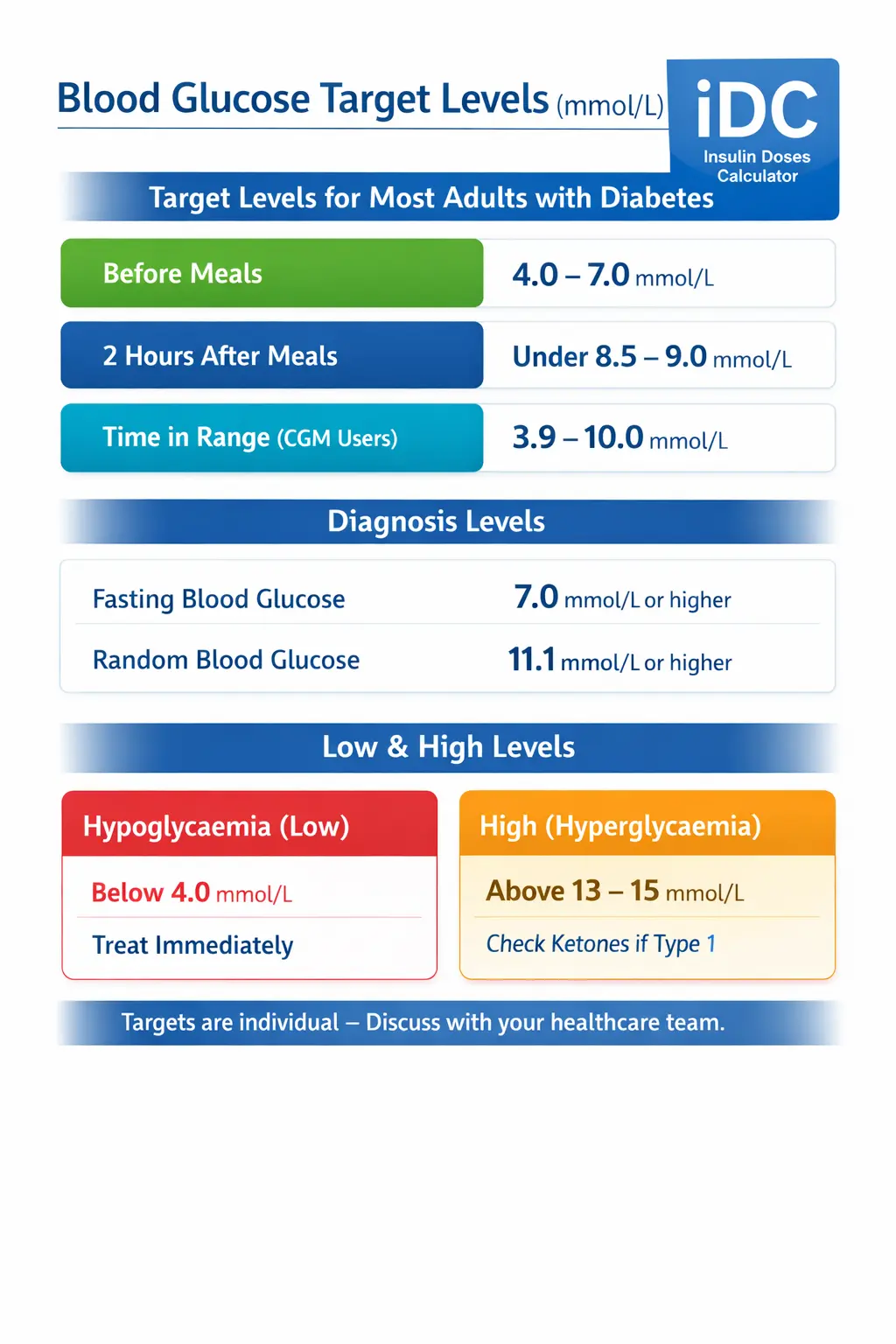
Yes. iDC uses commonly accepted clinical guidance for blood glucose targets. However, targets vary between individuals and should always be confirmed with your healthcare team.
iDC does not provide emergency or urgent medical instructions.
Your privacy is important:
Please see our Privacy Policy for full details.
Yes. Core features are designed to work offline. Some features, such as updates or sharing, may require an internet connection.
Currently, iDC uses manual data entry. Integration with external devices may be considered in future updates.
No. iDC is not intended for pregnancy or gestational diabetes, where specialist medical supervision is required.
iDC GlucoPlan will be available through a one-time purchase, with no recurring subscription. The price will be shown in the app store before purchase. Future major editions may be offered as separate paid apps. Purchasing a new edition is optional and is not required solely to continue using the edition you already purchased.
Support is available via:
User feedback helps improve accuracy and usability.
iDC is a support and information tool only. Always consult a qualified healthcare professional before making changes to your insulin treatment.
Insulin Doses Calculator is in development. We plan to release it for iOS and Android; download links will appear here when it launches.
Coming Soon


Insulin Doses Calculator is currently in development.
We are currently seeking expressions of interest from individuals, clinicians, and organisations who would like to use the Insulin Doses Calculator as part of food management and diabetes control, in conjunction with their local diabetic clinical team.
We are also seeking volunteers to test the app and share feedback. To volunteer, or to enquire about availability and future updates, please select a subject and complete the form below.
* Indicates required fields
For more information, please see our Privacy Policy.
The Insulin Doses Calculator is intended to support diabetes management and does not replace professional medical advice.
All insulin dosing decisions must be made in consultation with a qualified healthcare professional.
Users should always follow the guidance of their diabetes care team.